back to work

// case study · 01

Filaxy Files

A native macOS file manager,
built in 30 days with AI as my team —
then taken remote in 30 more.

Finder is broken for anyone who lives between Windows and Mac. So I built the Mac file manager I wish existed — Windows Explorer's clarity, Total Commander's dual-pane power, and (in v2.0) six native remote protocols, bidirectional sync, and an embedded SSH terminal. A process that wouldn't have been possible five years ago.

~30 days
Time to v1.0
240h
Dev hours
14K
Lines of Swift
0
External deps
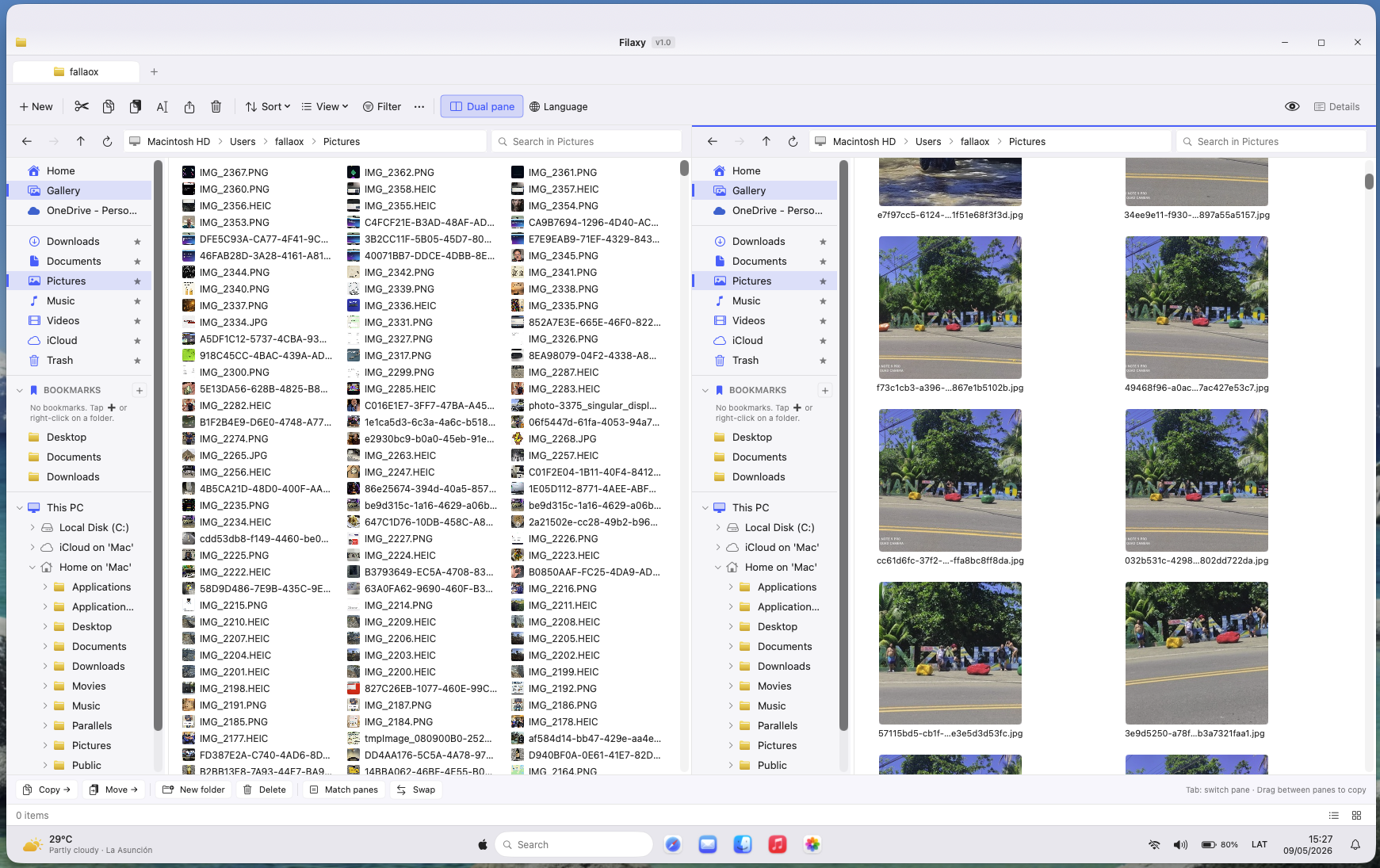
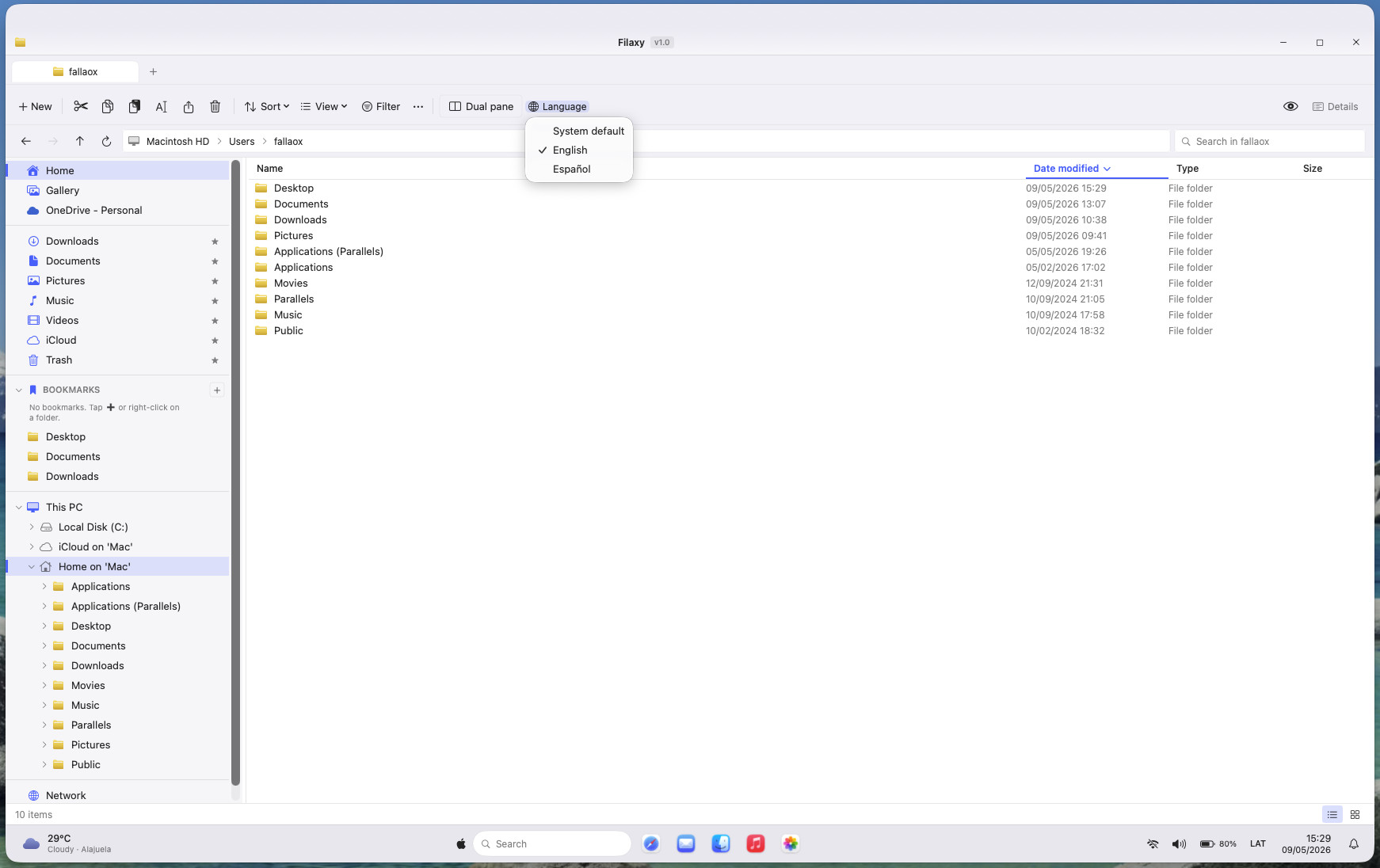
Filaxy Files in dual-pane mode showing two folders side by side
// dual-pane mode — the feature neither Finder nor Explorer ever shipped

// the itch

Finder is broken for half the world.

I'm a Senior Business Analyst by day. PC Windows from 9 to 6. Then at night I switch to my MacBook for personal projects — and every single time I touch Finder, something breaks in my brain.

Finder isn't just different. It's worse. Worse visually, worse functionally, worse for power users coming from anywhere else. Windows Explorer has had a real address bar, proper keyboard navigation, and (with Windows 11) tabs — basics macOS still treats as optional.

And here's the twist: dual-pane is the one thing neither Finder nor Explorer has ever shipped. The feature that breaks me hardest at midnight, when I'm moving files between two folders and have to open a second window and arrange them manually like an animal. Filaxy Files's dual-pane isn't catching up to Windows — it's the part where it overtakes Windows.

ForkLift exists. Path Finder exists. They're both fine. But neither one feels like "the file manager I wish came with the OS." They're ports of someone else's idea of what a Mac file manager should be — not what cross-platform power users actually need.

"I decided to stop suffering with Finder. Same day I had the idea, I started building."

// the user

For the dual-OS power user.

Most Mac apps are built for Mac purists — people who've used macOS their whole lives and don't want anything to feel different. Filaxy Files is the opposite. It's built for the developer who runs Windows at the office and Mac at home. The designer with a PC at the studio and a MacBook at the café. Anyone who lives between two operating systems and is tired of switching mental models every time they open a folder.

That single decision — target the dual-OS user, not the Mac purist — drove every UX choice in the app. Windows-style keyboard shortcuts. Dual-pane by default. A weather widget on the taskbar (yes, like Windows 11). A status bar that lives at the bottom of the window. Nothing alien, but nothing artificially "Mac-like" either.

// the stack

Native, lean, zero dependencies.

Filaxy Files is a Swift Package, not an Xcode project. That choice alone removed about 80% of the boilerplate that trips up indie Mac devs — no .xcodeproj Git conflicts, no derived data weirdness, no signing dance until release time. Just Package.swift, swift build, and a custom build-app.sh that wraps the binary into a properly bundled, ad-hoc signed .app.

Language Swift 5.9+
UI SwiftUI + AppKit (hybrid where it matters)
Min macOS Ventura 13+
Build Swift Package Manager
Dependencies 0 external
Localization ES (default) · EN (hot-swap)
Architecture MVVM + Coordinator
Files ~75 Swift files (v2.0)
Remote protocols SFTP · FTP/FTPS · WebDAV · S3 · B2
Signing Apple Developer ID + Notarized

Zero external dependencies. No SPM packages, no CocoaPods, no Carthage. Every line of file-system access, every animation, every UI primitive — pure Apple frameworks. That decision keeps the binary tiny, the startup instant, and the long-term maintenance burden close to nothing.

Spanish-first by design. The defaultLocalization in Package.swift is "es", not "en". English is added through the LanguageService with hot-swap (no app restart). My audience starts in Latam and grows from there.

// the process

AI-augmented, spec-driven.

I have 28 years of experience in IT. I understand systems, architecture, file systems, OS conventions. What I don't have — and never built — is a deep daily workflow in Swift or SwiftUI.

Five years ago, that gap would have stopped me. Today it didn't, because the constraint that mattered most stopped being "how fast can you write Swift" and became "how clearly can you specify what you want."

My methodology was simple and ruthless:

  1. Open Windows Explorer on a PC. Use the feature I want to replicate.
  2. Open Filaxy Files on the Mac. Try to replicate it.
  3. When it didn't match, take a screenshot, drag it into the conversation, and explain — in detail — what was wrong and how it should look.
  4. Ship the change. Test again. Repeat.

That workflow produced ~14,400 lines of Swift in 240 hours of nights and weekends. That's about 60 lines of code per hour — a number that doesn't make sense for a solo dev writing every line by hand. It only makes sense when the dev is acting as the architect, the QA, and the product owner simultaneously, with code generation handled in tight feedback loops.

"Working with AI requires a new skill: spec-writing visual. It's no longer 'ask it to write code' — it's 'show screenshots and explain exactly what should happen.' The skill of communicating intent precisely is the new craft."

// the hard part

Four problems that nearly stopped me.

01 · Folder performance

Listing 50,000 files in a directory without freezing the UI. The naive SwiftUI approach (List(items)) chokes past a few thousand entries. The fix is virtualized rendering, deferred metadata loading, and async folder size calculation — three patterns that needed to play nicely together without race conditions.

02 · UX parity with Windows Explorer

Every menu, context-click, keyboard shortcut, and drag gesture had to feel like Windows — but built on macOS primitives that don't quite map 1-to-1. The double click on a folder enters it (Windows). The right-click menu has the same items in the same order (Windows). The selected row stays highlighted on focus loss (Windows). Each of these is a tiny battle won by overriding the default macOS behavior with something that respects native frameworks but feels foreign.

03 · The Photos library, the boss fight

macOS treats the Photos library as a sealed package, not a regular folder. FileManager can see the .photoslibrary container but can't read inside it. The only sanctioned way in is PhotoKit — a completely different API surface, with different permission flows, different identifiers, different async patterns.

Every single file-system feature I'd built — selection, copy, rename, delete, preview — had to be re-implemented for the Photos context. Two parallel implementations, one shared UI surface. Bug fixes had to be validated in both worlds. It was the closest I came to ripping the feature out entirely.

Filaxy Files showing Photos library with thumbnails on the right pane
// photos library integration — left: filenames · right: thumbnail rendering

04 · Six remote protocols, zero SDKs v2.0

The first version of Filaxy Files was local-only. To compete with ForkLift ($29.95) and Transmit ($45) I had to make the app speak six remote protocols — without breaking the zero-dependencies promise. No AWS SDK, no libssh, no curl, no third-party FTP library.

SFTP / SSH wraps the OpenSSH CLI shipped with macOS (/usr/bin/ssh, sftp, scp) via Foundation.Process, with ControlMaster keeping a single auth socket alive across operations. WebDAV is a hand-written PROPFIND parser on top of URLSession. Amazon S3 is SigV4 signing in pure Swift — every HMAC-SHA256 step, every canonical request, every authorization header, written from scratch against the AWS spec. Backblaze B2 uses the native API with a 23-hour session cache and per-upload SHA-1 integrity.

On top of that: a bidirectional Sync engine (three modes — upload, download, two-way — with per-conflict resolution and reusable sync profiles), and an embedded SSH Terminal sheet styled after Terminal.app, with a per-connection preferred shell that forces PowerShell on Windows OpenSSH servers without touching the server. About 7,000 new lines of Swift in 30 days, and the bundle stayed at ~5 MB.

"The zero-dependencies rule wasn't ergonomic — it was strategic. Every SDK you ship is a future security advisory and a future binary bloat. Filaxy Files v2.0 competes with apps 5× its size, and that's not an accident."
// the features

The pieces that make it Filaxy Files.

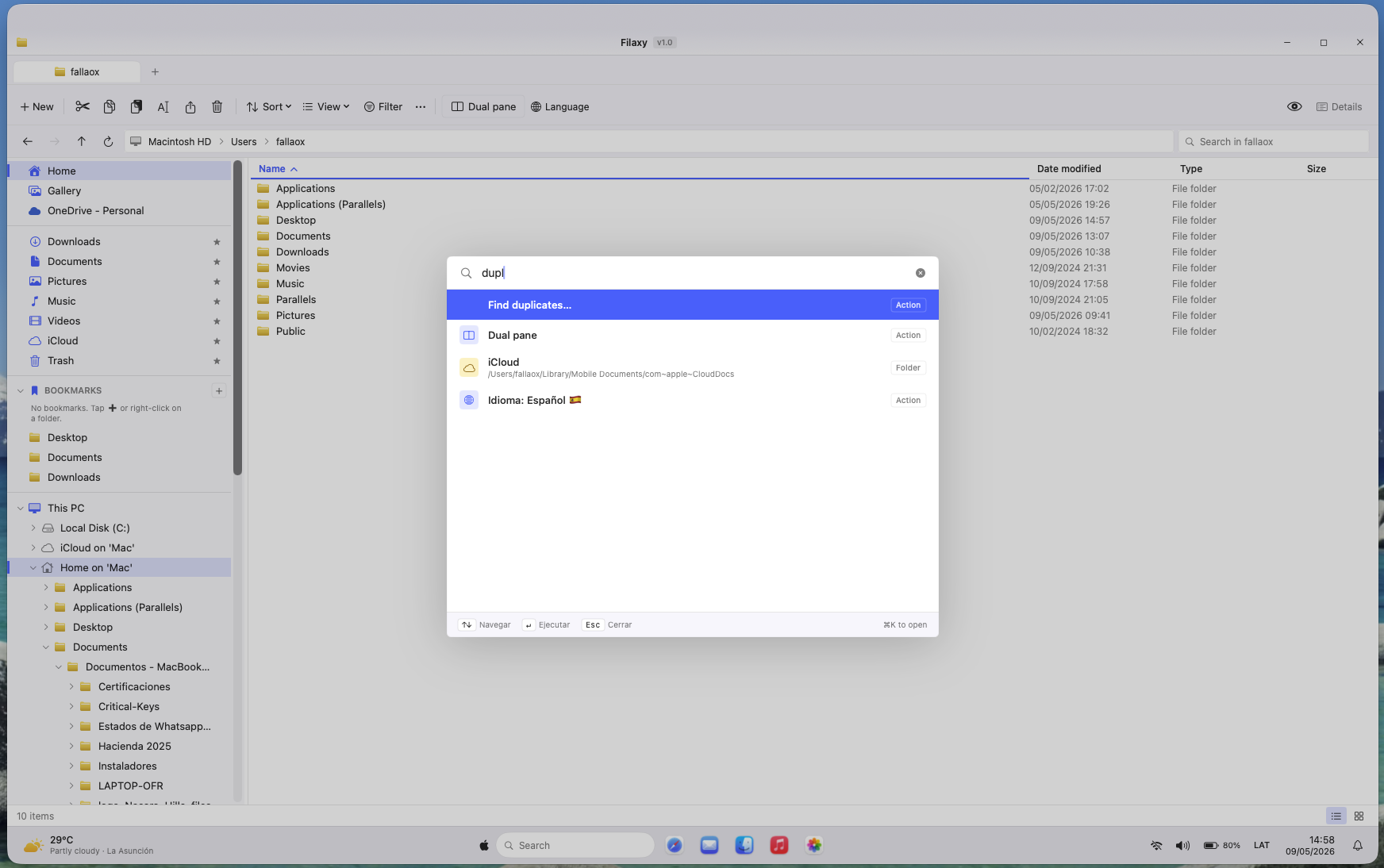
Command palette · ⌘K

Every action in the app is one keystroke + a few characters away. Find duplicates, switch panes, change language, jump to iCloud — all without ever leaving the keyboard. Borrowed from Linear and Raycast, native to Filaxy Files.

Command palette open in Filaxy Files
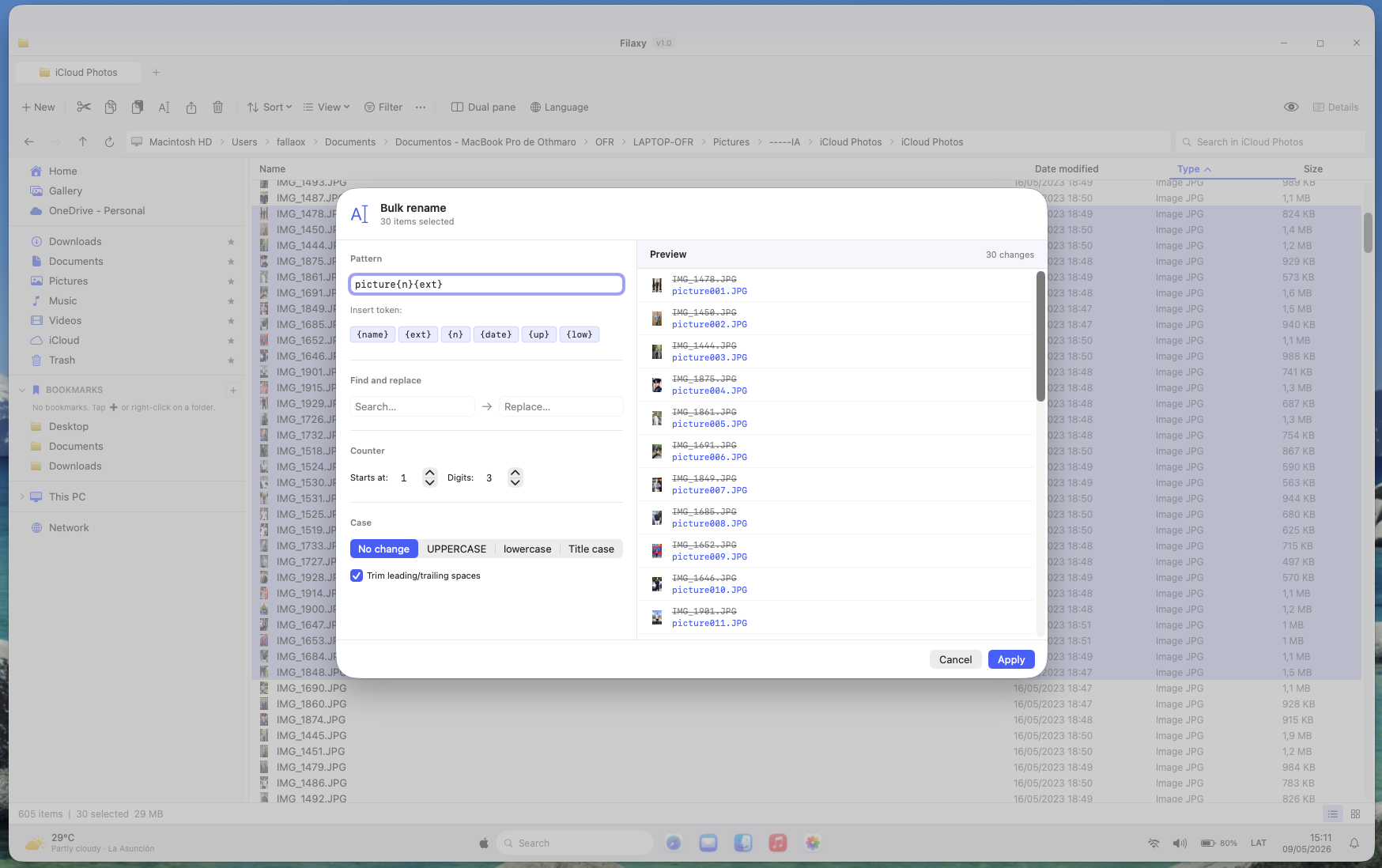
Bulk rename sheet in Filaxy Files

Bulk rename

Select dozens of files, apply patterns, regex, sequencing, prefix/suffix — instant preview before commit. The kind of feature ForkLift charges for and Finder pretends doesn't exist.

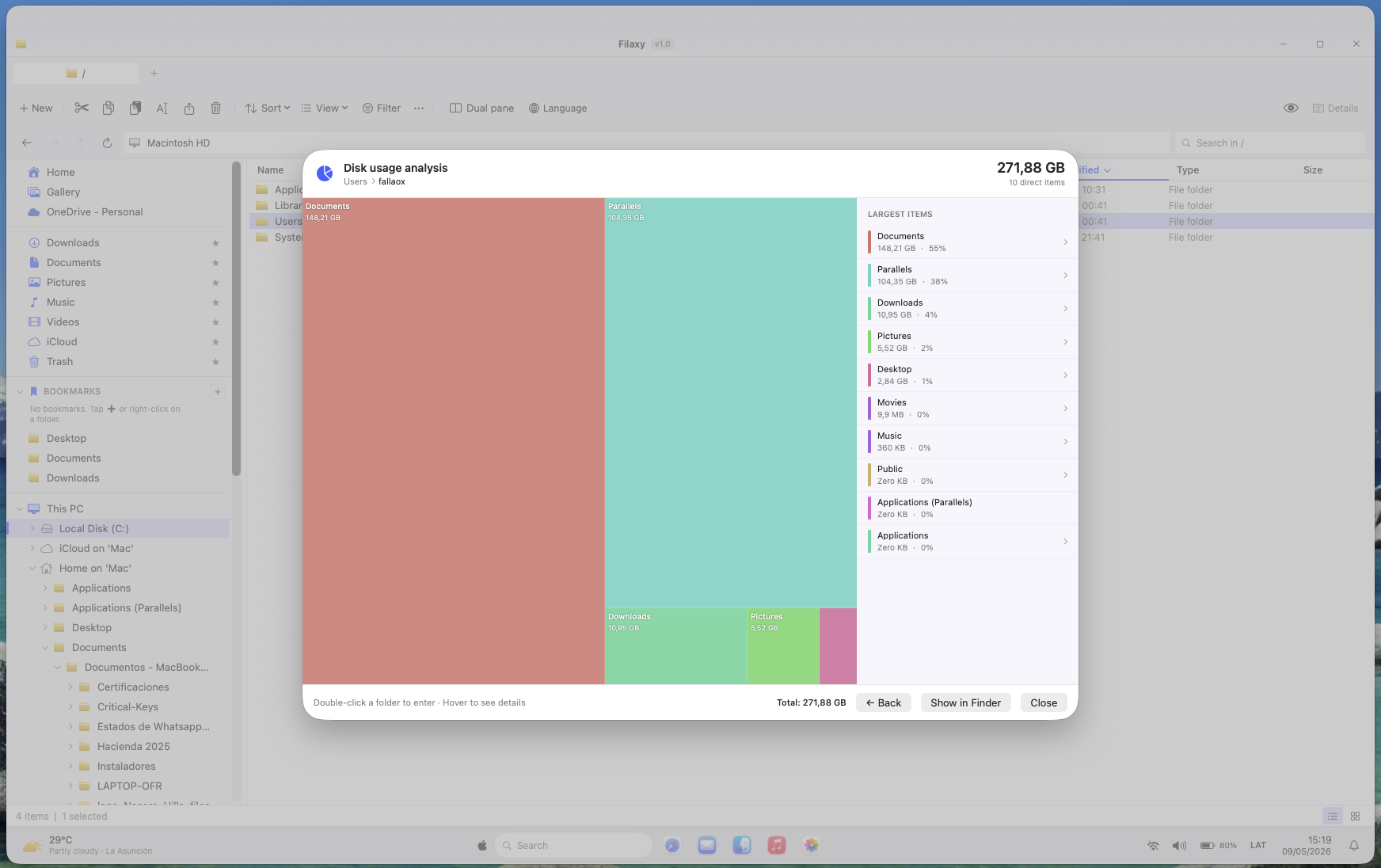
Disk usage treemap

Where did my 200 GB go? Filaxy Files answers in five seconds — a colored treemap where rectangle area equals folder size. Click to drill down, right-click to reveal in the Finder fallback. Powered by a custom TreemapLayout that recursively allocates space without a third-party charting library.

Disk usage treemap in Filaxy Files
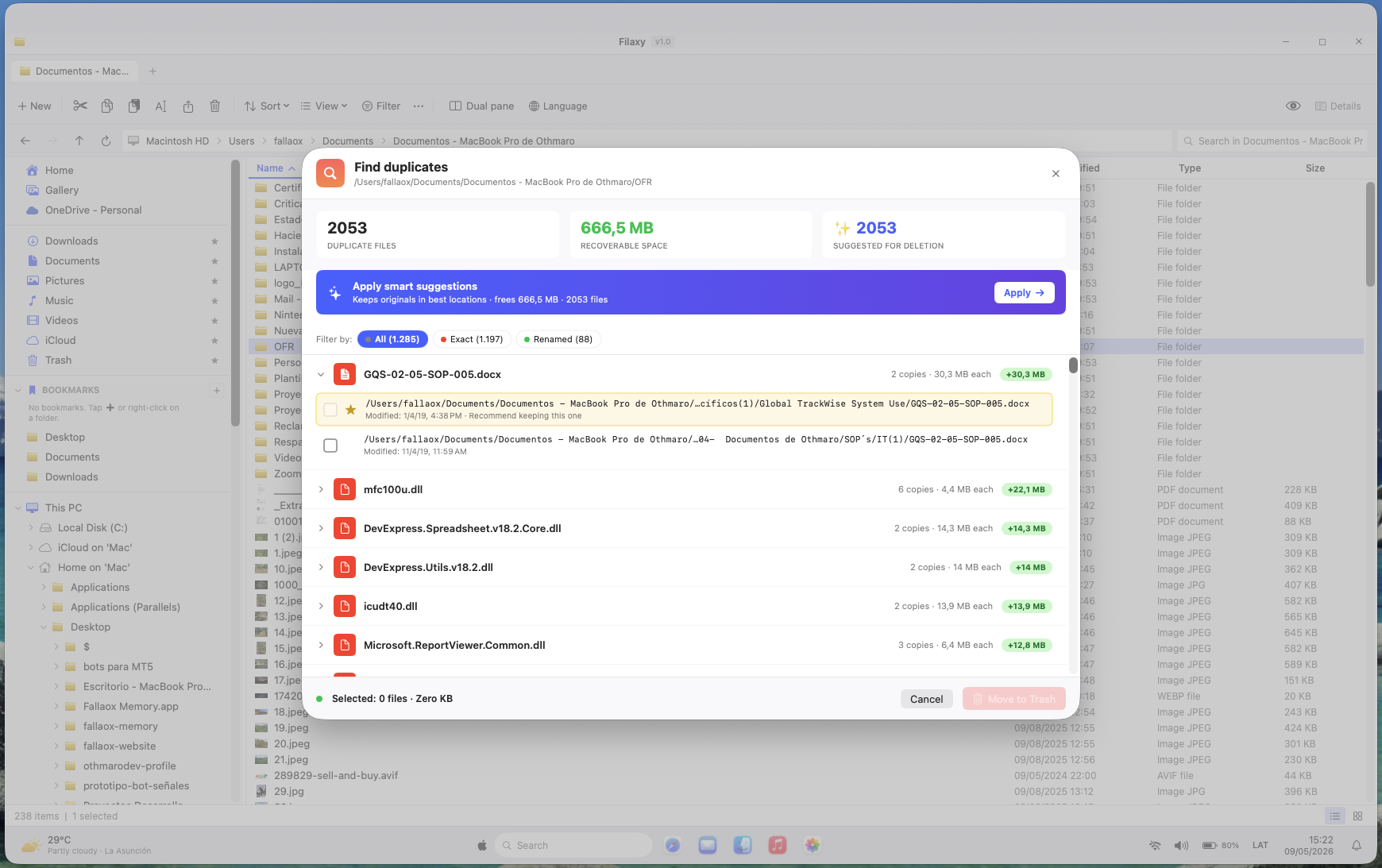
Duplicate finder in Filaxy Files

Duplicate finder · 3-phase scanner

Phase 1: group by size (cheap). Phase 2: hash the head bytes of each candidate (fast). Phase 3: full hash only the survivors (expensive but rare). The naïve approach hashes everything; this one hashes 2-3% of files and gets the same answer.

Windows-style taskbar

Bottom of the window: Start-style menu, status indicators, a clock, a weather widget. Yes, a weather widget — because Windows 11 has one and the goal is to make Mac feel like home for someone leaving Windows. Implemented as a custom WindowsTaskbarView inside the app's chrome, not a system-level dock replacement.

Windows-style taskbar at the bottom of Filaxy Files
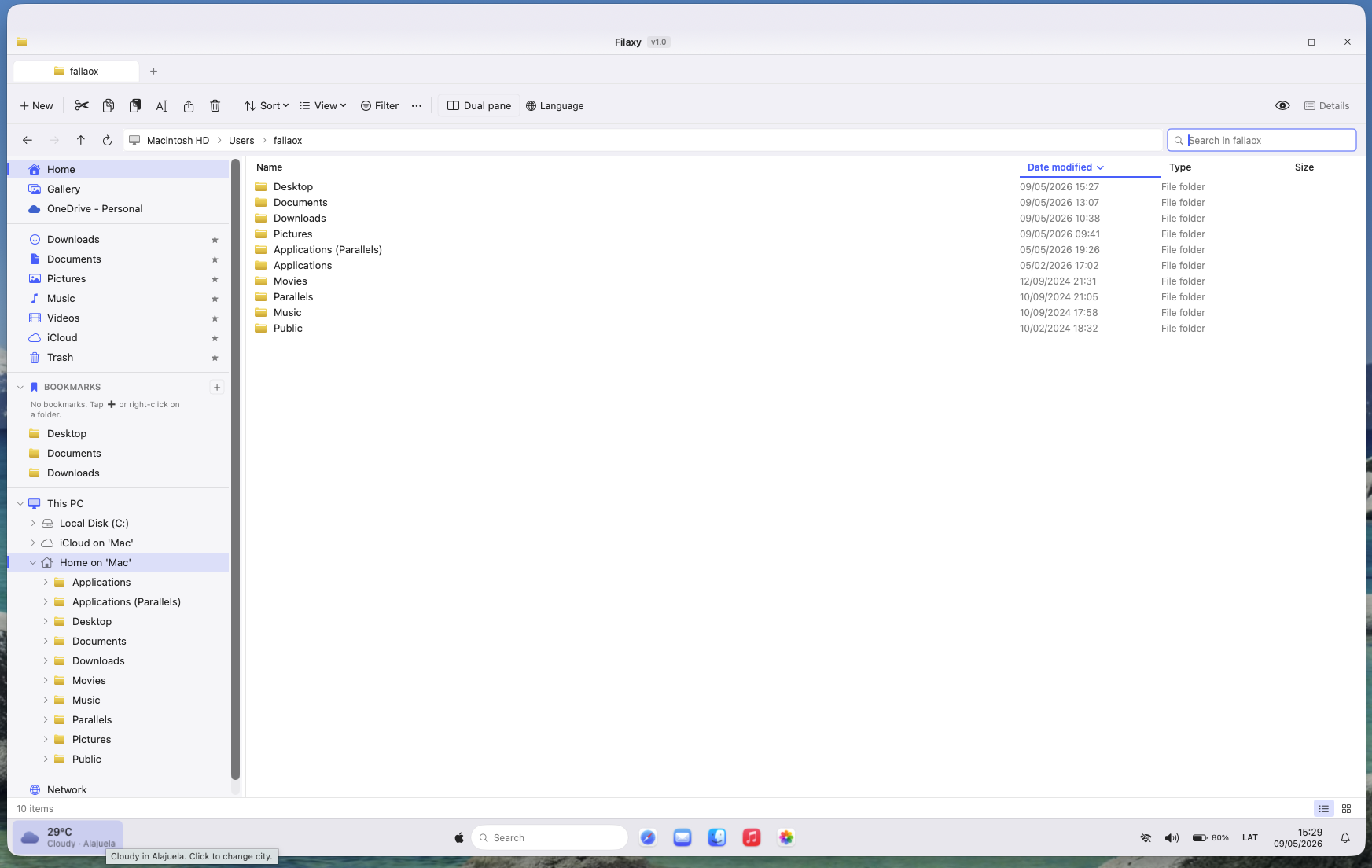
Language switcher dropdown in Filaxy Files

Hot-swap language switcher

ES ⇄ EN with no restart. Built on a custom LanguageService that wraps SwiftUI's localization with a publishable state — every visible string re-renders the moment the user picks the other flag.

// phase 2

30 more days. Filaxy Files goes remote.

v1.0 shipped local-only in April. By May, the question had shifted from "is this a better Finder?" to "can this stand next to ForkLift and Transmit?" The answer required six native remote protocols, a bidirectional sync engine, and an embedded SSH terminal — added in 30 days, without breaking the zero-dependencies promise or growing the bundle past ~5 MB.

· multi-protocol remote

Six protocols, one pane.

SFTP / SSH (OpenSSH CLI + ControlMaster), FTP / FTPS, WebDAV / WebDAVS (Nextcloud, ownCloud, Synology, iCloud Drive), Amazon S3 + S3-compatible (MinIO, Wasabi, Cloudflare R2, DigitalOcean Spaces), and Backblaze B2 on its native API. Per-pane connections — local on one side, remote on the other, drag-and-drop in either direction.

  • · SigV4 signing — pure Swift, zero AWS SDK
  • · PROPFIND parser — hand-written
  • · OpenSSH ControlMaster — one auth, persistent socket
· bidirectional sync

Mirror, in three directions.

A folder-mirror engine that goes upload-only, download-only, or two-way against any remote. Per-conflict resolution UI (keep local, keep remote, keep both). Reusable sync profiles per connection. Triple activation — keyboard shortcut, File menu, toolbar button.

  • · Three modes — upload · download · two-way
  • · Conflict UI per file
  • · Save profiles, re-run with one click
· embedded ssh terminal

The shell you wanted, in-app.

A built-in terminal sheet styled after Terminal.app — with a per-connection preferred shell that forces PowerShell on Windows OpenSSH servers without touching the server. Base64-EncodedCommand wrap, arrow-key history, ⌘K to clear. Things ForkLift and Transmit don't ship.

  • · Auto · cmd · pwsh · bash · zsh · sh
  • · PowerShell base64 wrap, transparent
  • · Terminal.app aesthetics, inline prompt

And then the last piece for direct distribution: Apple Developer ID signing + notarization. Every release is now Gatekeeper-clean — no "downloaded from internet" warnings, no right-click-to-open dance. The full xcrun notarytool workflow lives in build-app.sh, opt-in via NOTARIZE=1.

// the numbers

Honest, unfinished, in motion.

Filaxy Files is in active development. v2.0 has been dogfooded for weeks against real WebDAV (Nextcloud, pCloud), real S3 (MinIO + DigitalOcean Spaces), real Backblaze B2, and SFTP against a Windows OpenSSH VPS. Every transfer, every sync run, every terminal session is going through my own product.

"The first time I opened the dual-pane and dragged a file between panels I told myself: this is what I always wanted on Mac. The first time I dragged a file from a local folder into a Backblaze bucket on the other pane, same feeling — twice."

17K+
lines of swift
0
external deps
~75
source files
6
remote protocols

// in retrospect

What I'd do differently.

A visual test suite from day one. Every view in Filaxy Files renders dozens of small details — sort indicators, hover states, focus rings, contextual menus. Right now, when something breaks visually I find out by using the app. Snapshot tests would have caught regressions in seconds instead of days.

Bilingual from the first commit. I shipped English on top of Spanish a few weeks in, which meant retroactively wrapping every user-facing string in the localization service. Starting with both languages from the start would have skipped that refactor entirely — and forced me to think about string length and layout breakage from the beginning.

// what's next

The next 90 days.

v1.0 shipped. v2.0 went remote. The next sprint is about polish, distribution, and turning the dogfood loop into actual paying customers.

  1. Remote Quick Look, bookmarks, and recursive search. Press Space on a remote file to preview without a full download. Bookmark deep paths per connection. Search inside a remote folder tree from the address bar. The three small affordances that make a remote pane feel as fast as a local one.
  2. Visual DMG installer + Sparkle auto-update. A branded DMG with a custom background and drag-to-Applications layout, plus Sparkle.framework wired into the app so v2.1, v2.2, v3 land without a re-download. Standard table stakes for direct-sale Mac software.
  3. Lemon Squeezy + license activation flow. Ed25519-signed license keys, Keychain storage, in-app activation, 7-day full trial. The checkout already lives at filaxy.app; this connects it to the binary so a purchase actually unlocks the app.
  4. Soft launch at $19.99 lifetime. Once the three above are clean, open the gates. Limited launch price, lifetime updates, 60-day refund, no questions.

One year from now

  1. The default file manager for Mac power users coming from the Windows world. The answer to "how do you handle files on Mac?"
  2. One mention in a top Mac newsletter — MacStories, The Sweet Setup, or Macworld. Validation that the work resonates beyond me.
  3. Self-sustaining. Sales cover hosting, the domain, and the Apple Developer Program ($99/year). Not life-changing money — but a product that pays its own rent.

// how it ships

Direct download. Lifetime license. No subscriptions.

Filaxy Files is sold direct from filaxy.app — single payment, lifetime license. No Mac App Store cut. No subscription that turns your file manager into rent. The checkout and license live with Lemon Squeezy; the binary downloads from their CDN. You buy it once, you own it for as long as macOS lets it run.

I picked direct distribution over the Mac App Store deliberately. The 30% Apple cut on a $19.99 product is steep — but more importantly, the App Store sandbox blocks half the things that make Filaxy Files useful: full-disk access, system-wide hotkeys, cross-volume operations. The trade is real — no MAS discoverability — but the product gets to keep its teeth.

launch price
Filaxy Files v1.0 — early adopter
$19.99 $29.99
  • · Lifetime license — pay once, use forever
  • · Lifetime updates — every future version, included
  • · 1 Mac per license
  • · 7-day free trial, no card required
  • · 60-day refund, no questions
After the launch window
$29.99

Same license. Same lifetime updates. The price just rewards the people who show up early.

The commerce stack

Payments Lemon Squeezy (Merchant of Record)
License keys Ed25519-signed, locally validated
Activation limit 1 Mac per license
Updates Sparkle.framework (auto-update)
Distribution Direct sale (no Mac App Store)
Code signing Apple Developer ID + Notarized (live)
Trial 7 days, full feature access

I picked Lemon Squeezy over Paddle for two reasons: it sets up in hours instead of days of KYC review, and the license API is cleaner to integrate from Swift. Both are Merchants of Record — they handle global VAT, sales tax, and disputes — so I don't end up filing tax forms in 30 countries to sell a $20 app.

// the brand

From Filaxy to FILAXY — the umbrella reveals itself.

When I shipped v1.0 the app was just called Filaxy. By the time v2.0 went remote — six protocols, sync engine, embedded SSH terminal — it was obvious the project had outgrown a single-app identity. The file manager wasn't going to be the only thing Filaxy ever ships.

So I split the brand into two layers. FILAXY is now the umbrella — the parent brand that future apps will hang from. The legal entity behind it is Filaxy Labs (LLC or INC, TBD on formal registration). And the macOS file manager you've been reading about for the last 900 lines is now its first product: Filaxy Files.

Future apps under the umbrella will follow the same naming model — Filaxy [Noun]: Filaxy Sync, Filaxy Drive, whatever ships next. The site at filaxy.app stays the product home for now; an umbrella-level catalog will move there once there are two products to catalog, and Filaxy Files will move to its own subdomain (files.filaxy.app).

"Naming a single product is a hundred decisions in a row. Naming a brand that will outlive any single product — that's a different exercise. The umbrella had to be neutral enough to host whatever comes next without contradicting it."

· umbrella brand

FILAXY

The parent. Holds the visual identity (gold extruded wordmark), the domain filaxy.app, and the brand promise of every product below it.

· legal entity

Filaxy Labs

The company that owns the brand and ships the products. LLC or INC sufix to be set when the entity is formally registered.

· first product

Filaxy Files

This app — the macOS file manager. Dual-pane, treemap, bulk rename, duplicate hunter, ⌘K palette, six native remote protocols, bidirectional sync, embedded SSH terminal. Notarized, ~5 MB, zero dependencies.

// signal

Want early access?

Filaxy Files launches publicly soon. If you're a dual-OS power user, a Mac dev curious about the build, or just want to be part of the early adopters — reach out.

back to work